This procedure describes how to connect a PC directly to a chromatograph using an Ethernet cable without a network switch.
- Connect the PC and the chromatograph using a cross-over Ethernet cable. A straight-through cable is not recommended.
- Open Windows settings:
- Settings → Network & internet → Advanced network settings.
- In the Network adapters section, locate the Ethernet adapter and expand it.
- Click Edit next to More adapter options.
- In the Ethernet Properties window, select Internet Protocol Version 4 (TCP/IPv4) and click Properties.
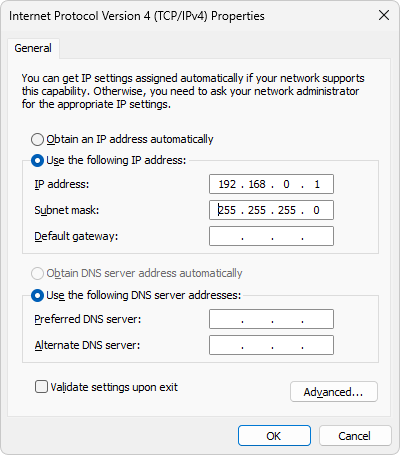
- In the Internet Protocol Version 4 (TCP/IPv4) Properties window, select Use the following IP address.
- Enter the IP address:
- The first three numbers define the network and must be the same as in the device IP address.
- The last number defines the device and must be unique within the network. Do not use an address already assigned to a connected instrument.
- Ensure that other Ethernet boards in the computer do not use the same network.
- Set the Subnet mask to 255.255.255.0.
If communication with a LAN-connected device is lost after restarting the PC, refer to Device connected via LAN does not communicate after PC restart.