Here we describe how to add a Named Group to the calibration.
Named Groups are used to sum the amounts of already calibrated peaks and report them together. This is useful when legislation requires reporting the summed amount of several compounds (e.g., PAHs in drinking water).
If you need to evaluate related compounds as one component already during calibration, see Adding a group to calibration.
- Open the Calibration window with the desired calibration and standard file.
- Use the Calibration - Add Named Group command or the Add Named Group icon
 to invoke the Edit Named Group dialog.
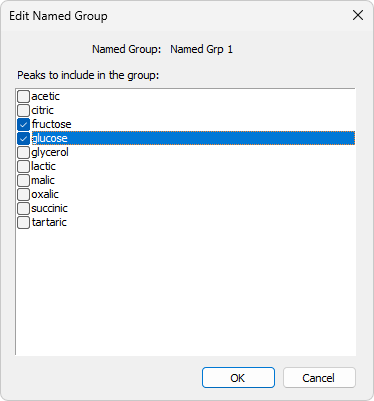
- Here you can select individual peaks you want to include in a Named group. All peaks present in calibration are available for selection and are listed alphabetically. Unlike standard groups, a peak can be part of multiple Named Groups.
- Click OK.
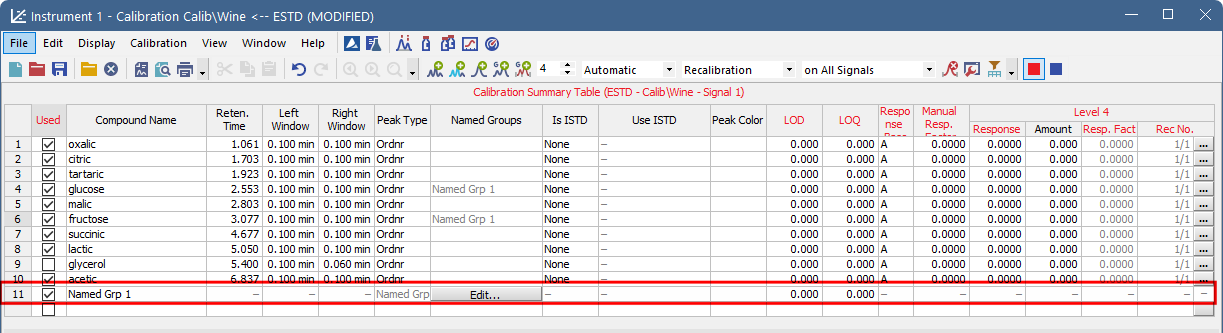
New row will be inserted in the Calibration Summary Table. The name of the Named Group can be set in the Calibration Summary Table, the same way as compound names. To edit an existing Named Group, click the Edit... button in the Named Groups column in the selected Named Group row of the Calibration Summary Table.
In the Result Table of the Chromatogram window, Named Groups are listed below the Total row to indicate that their amounts are not included in the total calculation.
In the Summary Table of the Chromatogram window, Named Groups are not supported.