Export MS Chromatogram
Clarity provides two different ways to export data acquired on MS instrument. The appropriate export method depends on whether you need to preserve the full MS data suitable for further processing in external MS software or need to only export selected MS signals as standard chromatograms, similar to chromatogram export on non-MS instruments.
Exporting full MS data
To export the complete MS chromatogram in an MS-specific data format, use the menu command File - Export - Export MS Chromatogram…. This command opens the Export MS Chromatogram dialog.
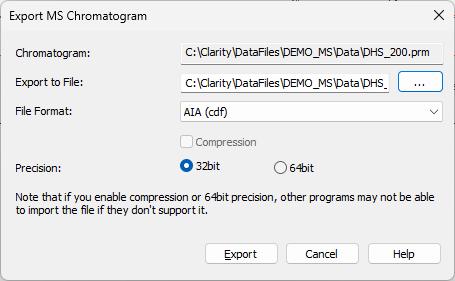
Export MS Chromatogram dialog
Chromatogram
Displays the name of the chromatogram that will be exported.
Allows to define the file name of the chromatogram export, including its path. If no value is selected, the exported file will be named according to the original chromatogram.
Defines the file format to which the chromatogram will be exported. Clarity supports the export to AIA (cdf), mzXML, MzML and mzData formats. Different formats may support different features being exported - namely, in case of a chromatogram with more than one spectral information, the AIA (cdf) will export all spectra and also all standard signals to the *.cdf file, while other export formats will only export first spectral data and no standard signals.
Sets whether the data will be compressed during the export to mzML and mzXML formats. The target software must support import of compressed data to import it succesfully.
Sets the data precision during the export. Select the precision according to the target software into which the data will be imported, as some applications support only 32-bit data. Clarity supports import with 32-bit precision set.
The header of the exported file will contain information provided by the control module - the type of the ionization, number of ion sources etc. To check the information before exporting, the user may use the Show MS Conditions… button on the Measurement Conditions - Instrument tab of the MS Chromatogram window, which will open the MS Measurement Conditions dialog.
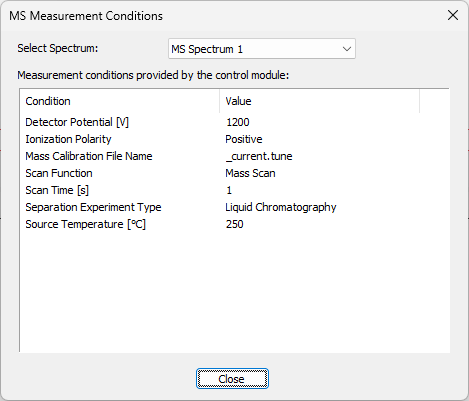
MS Measurement Conditions dialog
Exporting MS data as non-MS chromatogram
To export MS data as a standard chromatogram, use the menu command File - Export - Export Chromatogram….
This command opens the Export Chromatogram dialog, which has the same layout and behavior as the standard Export Chromatogram dialog used for non-MS instruments. For a detailed description of the dialog controls, see the chapter Export Chromatogram.
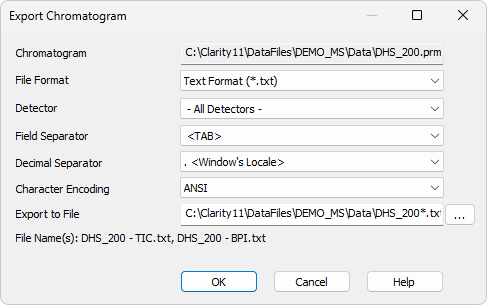
Export Chromatogram dialog
Using Export Chromatogram… allows you to export only predefined MS signals that were configured before the measurement (depending on the specific MS detector setup).
The number of available signals and their m/z definitions are set prior to acquisition, typically in the detector setup in System Configuration and in the MS tab of the method.
By default, the available signals include the Total Ion Chromatogram (TIC) and the Base Peak Intensity (BPI). Extracted Ion Chromatograms (EIC) can also be exported, provided they were defined before the measurement, therefore signals created temporarily after the run are not available for export.
The exact configuration workflow and available options are specific to the MS detector control module. Please refer to the documentation of the corresponding MS detector for details.
The export behavior depends on the selected file format: for *.CHR and *.ASC, all selected signals are exported into a single file, whereas for *.TXT and *.CDF, a separate file is created for each signal.