Recovering data after crash or freeze
If Clarity crashes or freezes during data acquisition, it is possible to recover the data up to that moment.
During acquisition, data are stored in the temporary directory (by default C:\USERS\<user name>\AppData\Local\Temp\CLARITY\$ch1run.raw file). The data are stored from memory to disk approximately every 10-90 seconds intervals (the exact interval depends on the detector frequency).
Here is a simple guide on how to restore the data:
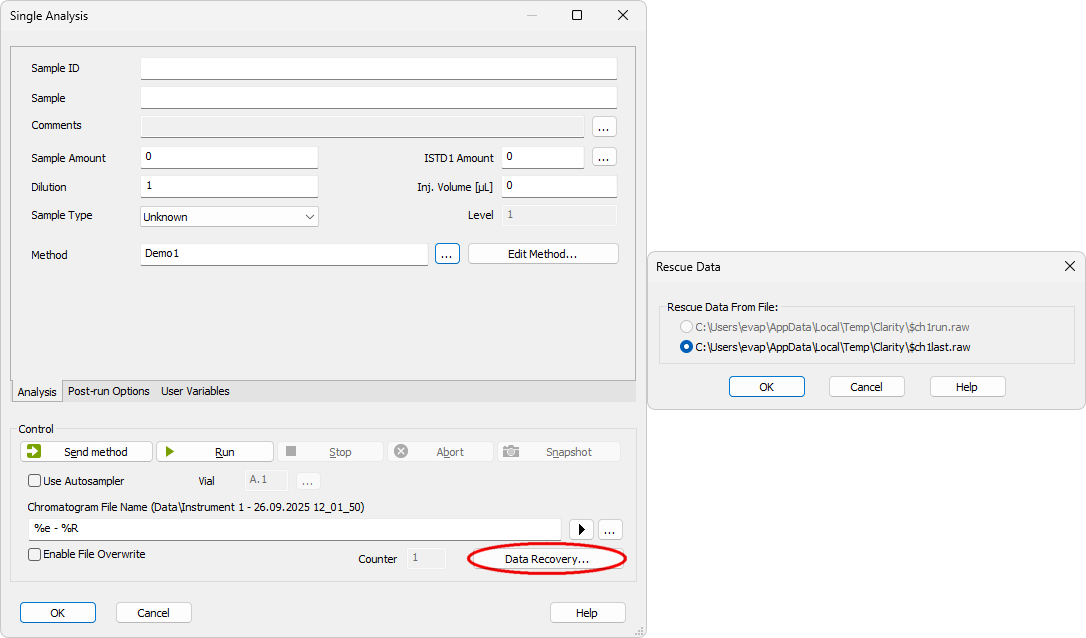
- Open Single Analysis dialog.
- Select the Data Recovery command to reconstruct the chromatogram. There can be two files to choose from:
-
*RUN.RAW file will be created only when Clarity station has been unexpectedly terminated while measuring data (e.g. after a power failure)
-
*LAST.RAW file always contains the last measured chromatogram
Note that the recovered chromatogram will be processed using the method and parameters defined in the Single Analysis dialog. Only the processing part of the method (e.g., integration settings, calculations) is applied. Instrument control parameters (such as pump flow) are not taken into account.
After a freeze, recovery depends on whether the background thread writing data was still running. After a crash, data can usually be recovered up to the last minute before the failure. If freezes happen repeatedly, we advise to investigate the cause - please do not hesitate to contact us via the Support Request form on our website and send us the respective a diagnostic files (including a memory dump file).