Using an Offline Instrument for Data Evaluation
Clarity allows you to use a non-purchased Instrument (Offline Instrument) for data evaluation while a measurement is running on another Instrument. The Offline Instrument cannot be used for data acquisition, but it can be safely used for opening chromatograms, reviewing results, and preparing reports.
How to set it up and use it
- Open the System Configuration dialog from the main Clarity window.
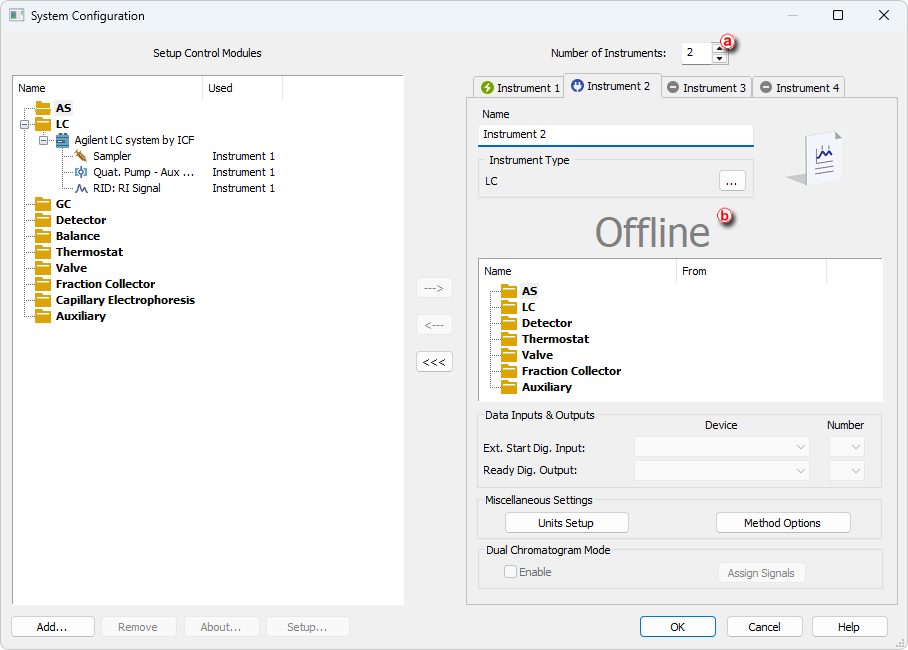
- Increase the Number of Instruments ⓐ (for example from 1 to 2).
- A new Instrument tab appears. This Instrument is not licensed for acquisition and is marked as Offline ⓑ.
- Close the System Configuration dialog.
- Open the Offline Instrument from the main Clarity window.
- Open a project and use the Offline Instrument for data evaluation while the measurement continues on the other Instrument.
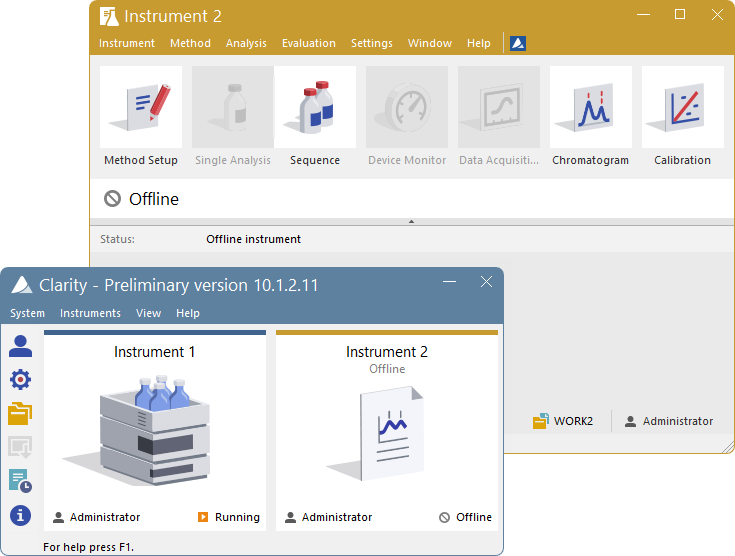
Limitations and Recommended Use
When using an Offline Instrument, the following limitations must be considered:
Offline Instrument cannot use devices assigned to a different Instrument.
As a result, methods cannot be prepared or edited on an Offline Instrument, because method content depends on the devices available on the Instrument.
Files in use by another Instrument are locked to prevent conflicts.
Any file used by the measuring Instrument (method, sequence, calibration) cannot be edited on the Offline Instrument at the same time. This prevents interference with the running measurement. For this reason, an Offline Instrument is best used for evaluation of chromatograms from a different project than the one currently being measured, or for read-only work with data that are not actively used.
If users require data evaluation and method preparation from a different computer (for example from an office PC), Clarity Offline is a more suitable solution. In such cases, Clarity Offline can be used according to the setup described in the Clarity in Network manual.