Communication with LIMS during measurement
During measurement, Clarity can also pass real-time information to a LIMS. These notifications allow the LIMS to track the progress of individual samples by receiving a message when a measurement starts or when it finishes. There are multiple ways to obtain such notifications.
Exporting through Event Table
The Event Table allows Clarity to trigger actions automatically at specific points during acquisition. The Event Table can set in Method Setup dialog with the following events:
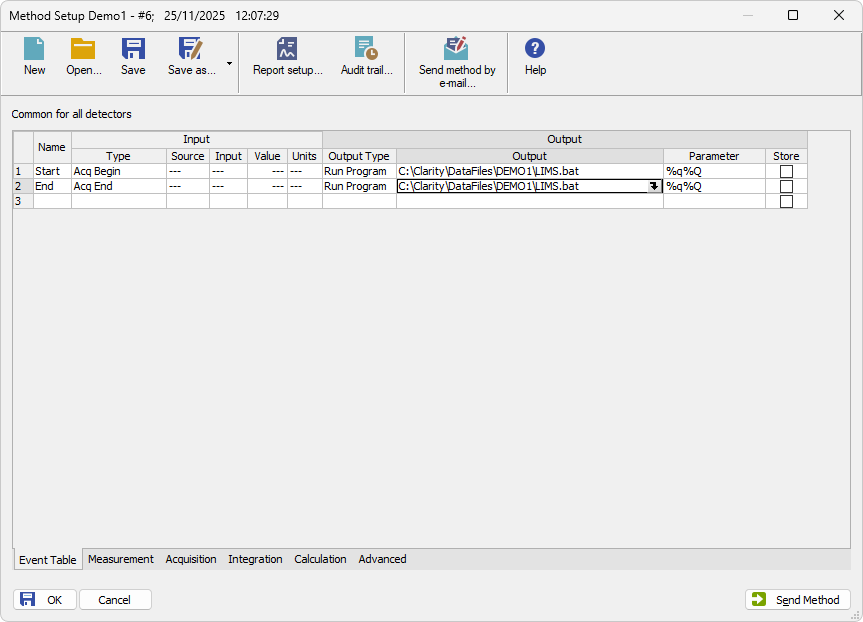
- Acq Begin: triggered at the start of acquisition. Suitable for sending a message such as “Sample XYZ has started measuring.”
- Acq End: triggered at the end of acquisition .Suitable for sending a message such as “Sample XYZ has finished measuring.”
Both events use Run Program as the Output Type, because the notification is implemented by calling an external script. The Output field contains the path to the external script, and the Parameter field defines which Clarity variables (e.g., %Q for Sample Name) are passed to the script.
Export in Sequence table
In addition to the Event Table, Clarity can also send parameters to the LIMS using special columns available in the Sequence Table. This method links the notification directly to a specific sequence line and does not rely on acquisition events and effectively mirrors an Acq End Event Table action.
To enable this, three special columns must be displayed in the Sequence Table by using left-click Setup Columns....
- Run Program - a checkbox that determines whether the action should be executed for this sequence line after the run finishes.
- Program To Run - defines the external program or script to execute.
- Parameters - contains the parameters passed to the program.