Text/Line Label
The Text Label and Line Label dialogs are used to add text labels or lines to the graph.
Text Label
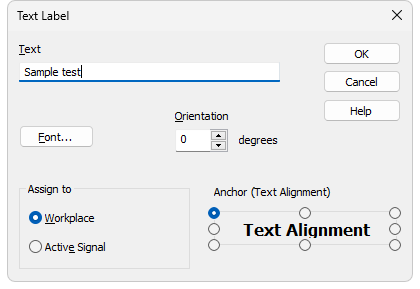
The Text Label dialog is opened after selecting the Text.. command from the Create Label submenu and clicking the desired position in the graph. It can also be opened by double-clicking an existing text label.
Text Label
Enters or edits the label text.
Sets the font, size and color of the label text. Invoking the command opens the standard Font dialog.
Sets the label text orientation in degrees counted counter clockwise. For example, enter 0 for horizontal text or 90 for vertical text. The Orientation field can be used only with TrueType fonts. Allowed values are 0 to 359.
Delete
Deletes the selected label. Available only when editing an existing label opened by double-clicking it.
Workplace
The label is not attached to any specific chromatogram. It is placed in the background of the graph and is saved in the current desktop.
Active Signal
The label is attached to the active signal and becomes part of the chromatogram. When the signal is scaled up or down, the label remains anchored to the nearest signal point.
Defines which point of the label is used as the anchor point. You can select the center or one of eight points on the label border. This is useful when placing the label relative to a peak or to a fixed position in the graph.
A text label can be moved or resized directly in the graph. Left-clicking the label displays its frame and resize handles. Drag inside the frame to move the label. Resizing the frame also changes the font size.
Line Label
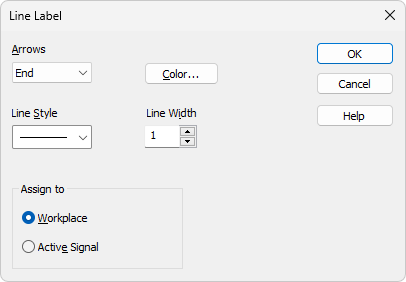
The Line Label dialog is opened after selecting the Line command from the Create Label submenu and dragging in the graph to define the line. It can also be opened by double-clicking an existing line.
Line Label
Sets optional arrows on the line:
None - No arrows will be placed on the line.
Beginning - An arrow will be added to the line beginning.
End - An arrow will be added to the line end.
Both - Arrows are displayed at both ends of the line.
Color…
Sets the line color.
Sets the line style. A Line Width greater than 1 can be used only with the default line style.
Sets the line width in pixels. Allowed values are 1 to 6. Values greater than 1 can be used only with the default line style.
Delete
Deletes the selected label. Available only when editing an existing label opened by double-clicking it.
Workplace
The label is not attached to any specific chromatogram. It is placed in the background of the graph and is saved in the current desktop.
Active Signal
The label is attached to the active signal and becomes part of the chromatogram. When the signal is scaled up or down, the label remains anchored to the nearest signal point.
A line can be moved or resized directly in the graph. Left-clicking the line displays its frame and resize handles. To move the line, drag it anywhere except its end points.