Using Target Compound Search
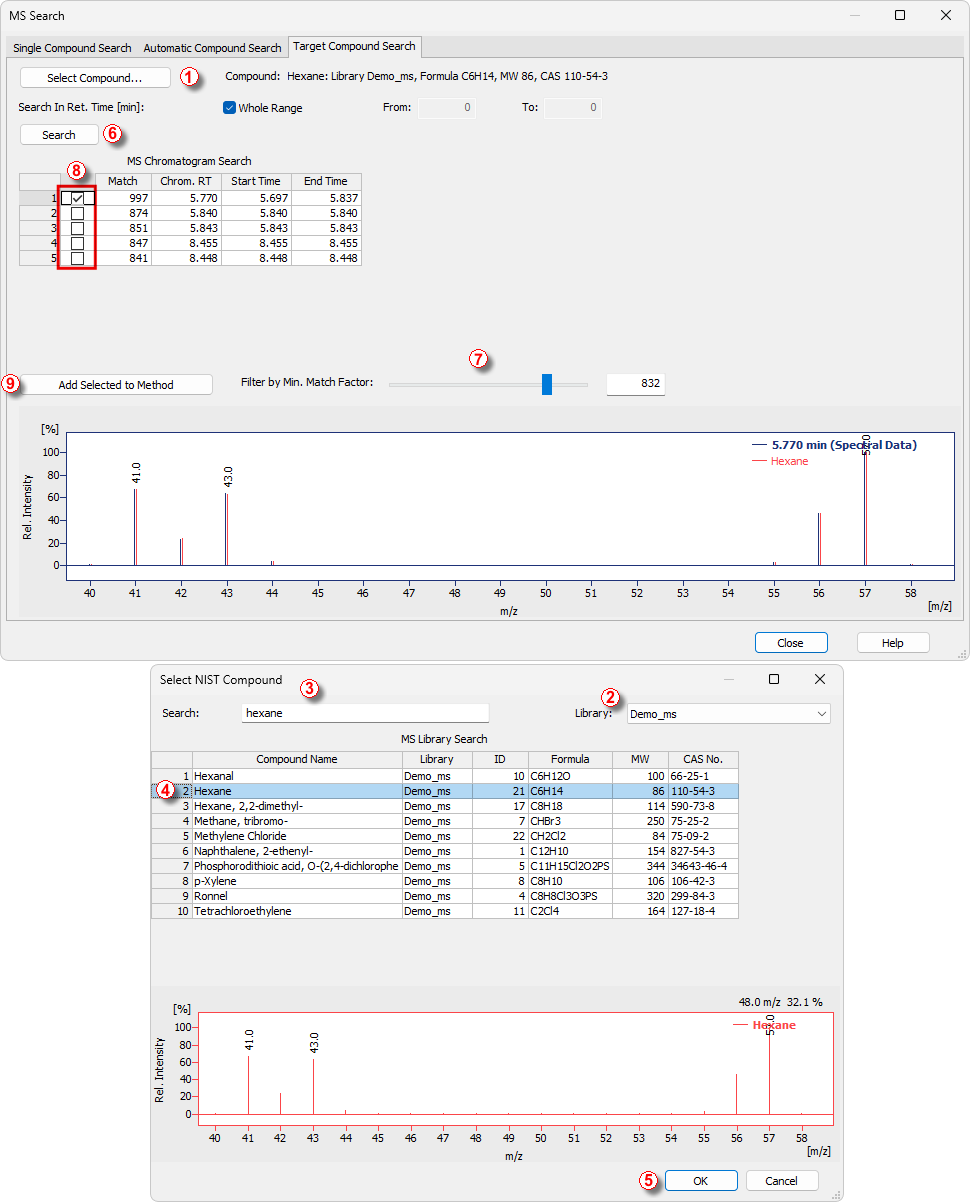
Target Compound Search is a two-step process serving for finding the presence or position of given compound (for which the user knows the spectrum) in the chromatogram. When you run an Target Compound Search, the Target Compound Search tab of the MS Search dialog opens.
- Click Select Compound ① to open the Select NIST Compound dialog.
- In the Select NIST Compound dialog, choose the correct spectral library to search in by using the Library ② drop-down menu.
- Type in the name of the compound into the Search ③ field. The table lists library compounds with names that best match the typed name.
Note:
The compound name search ignores any apostrophes, commas, dashes etc. you may type. This is the restriction of the MS Search external program.
- In the MS Library Search ④ table, select the desired compound.
- Click the OK ⑤ button to return to the MS Search - Target Compound Search dialog.
- Click the Search ⑥ button. The MS Chromatogram Search table will list chromatogram intervals where the spectra match the target compound.
- You can adjust the Filter by Min. Match Factor ⑦ slider or enter a value in the box to filter the matches.
- When you are satisfied with the match (or multiple matches), use the check box ⑧ for the chosen compound and click Add Selected to Method ⑨ to add the compound to the MS Method.